Energy per Atom of Gold Nanoclusters
1. Introduction
This tutorial calculates the energy per atom of cuboctahedral and icosahedral gold clusters with N = 30 to 60 atoms, relative to bulk gold, reproducing Fig. 4 of the following manuscript:
Manuscript
A. H. Larsen, J. Kleis, K. S. Thygesen, J. K. Nørskov, and K. W. Jacobsen, "Electronic shell structure and chemisorption on gold nanoparticles", Physical Review B 84, 245429 (2011). DOI: 10.1103/PhysRevB.84.245429. 1
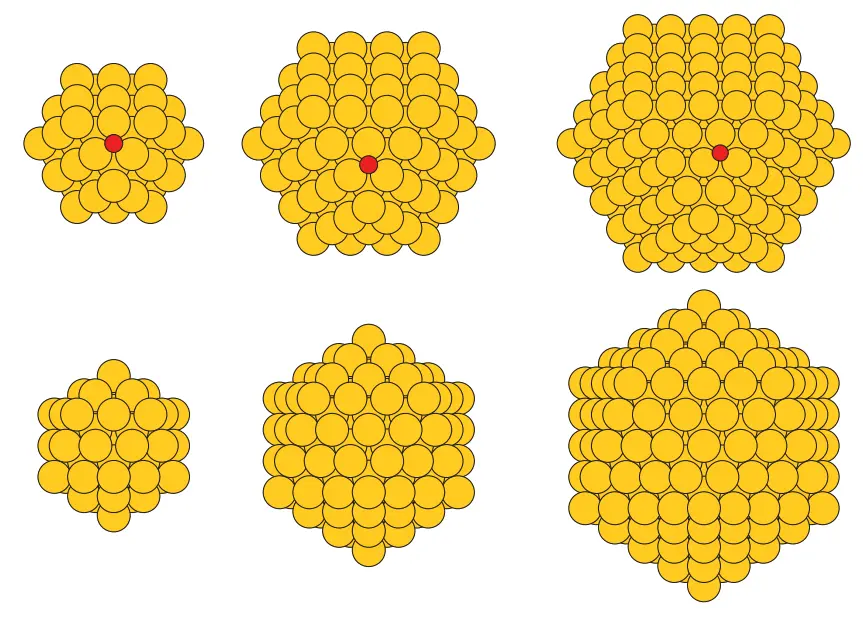
This tutorial builds upon the Gold Nanoclusters tutorial, where the clusters are created. The closed shells of 55 and 147 atoms are the regular shapes of FIG. 2 of the manuscript; every size in between is made from the next larger closed shell by removing a randomly chosen lowest-coordinated atom, one at a time, changing one adsorption facet only minimally (Sec. III C of the manuscript). The notebook keeps one (111) facet the same way, removing its atoms only when no other atom is left.
2. Prerequisites
The notebook loads each cluster from the uploads folder or the account's materials collection by exact name, Au<N> <Shape>, e.g. Au55 Icosahedron, and raises when one is missing. The clusters are saved by the notebook of the Gold Nanoclusters tutorial, which should be run first with the same shapes and sizes. Bulk gold, Gold, is loaded from Standata.
3. Workflow overview
Every energy comes from the platform's jobs: a Total Energy job on bulk gold and one fixed-cell relaxation per cluster. As in Fig. 4 of the manuscript, the energy of an N-atom cluster is measured from N atoms of bulk gold, per atom:
ΔE(N) = [E(Au_N) − N E_bulk] / N
with E(Au_N) the final energy of the cluster's relaxation and E_bulk the total energy per atom of bulk gold. The steps are:
- Set up the environment and parameters: cluster names, Density Functional Theory (DFT) model, relaxation settings, and compute settings
- Authenticate and initialize API client: connect to the platform
- Load the materials: the clusters by name and bulk gold, with their sizes and cells printed
- Configure the DFT model: one model for bulk gold and every cluster
- Configure compute resources: select cluster, queue, and processor settings
- Run the Total Energy job: on bulk gold
- Relax the clusters: every atom, at fixed cell
- Retrieve the results: the total energies and the energy per atom relative to bulk
- Compare with the manuscript: the computed values over Fig. 4
4. Calculation parameters
| this tutorial | Larsen et al. | |
|---|---|---|
| Code | Quantum ESPRESSO | GPAW |
| Functional | Perdew-Burke-Ernzerhof (PBE) | revised PBE (RPBE) |
| Basis | plane waves, Garrity-Bennett-Rabe-Vanderbilt (GBRV) ultrasoft pseudopotentials, 40 / 200 Ry | localized double-zeta polarized (DZP) basis, 0.2 Å real-space grid |
| Au valence electrons | 11 | 11 |
| Clusters | stripped from the 55- and 147-atom shells, one random seed, 5.0 Å of vacuum on each side | stripped from the 55- and 147-atom shells, four random seeds, 5.0 Å of vacuum |
| Bulk gold | face-centered cubic, a = 4.171 Å (Standata, mp-81), 16×16×16 k-points | not stated |
| k-points (clusters) | Γ point | Γ point (non-periodic cell) |
| Relaxation | every atom, fixed cell, forces below 0.075 eV/Å | forces below 0.075 eV/Å |
| Smearing | 0.005 Ry | Fermi temperature 0.01 eV (p. 245429-2); 0.1 eV (p. 245429-6) |
| Spin | spin-paired | spin-paired |
The platform's Quantum ESPRESSO has no RPBE, so the calculation uses PBE. Cell 1.4 holds these settings:
1 2 3 4 5 6 7 8 | |
forc_conv_thr is the force threshold of Quantum ESPRESSO, in Ry/Bohr; nstep is the largest number of ionic steps of one relaxation.
5. Step-by-step instructions
5.1. Open the notebook
Navigate to the API examples repository and open the simulation notebook:
1 | |
5.2. Set the shapes and sizes
Cell 1.2 selects the clusters. By default it relaxes the icosahedra of 40 and 55 atoms and the cuboctahedra of 50 and 55 atoms; the commented-out values select every size from 30 to 60:
1 2 3 4 5 6 7 | |
5.3. Set the compute resources
Cell 1.3 sets the cluster, queue, number of cores and time limit of every job:
1 2 3 4 | |
5.4. Run the notebook
Execute all cells by selecting Run > Run All Cells. The notebook authenticates with the platform, then runs the steps listed in section 3.
5.5. Read the results
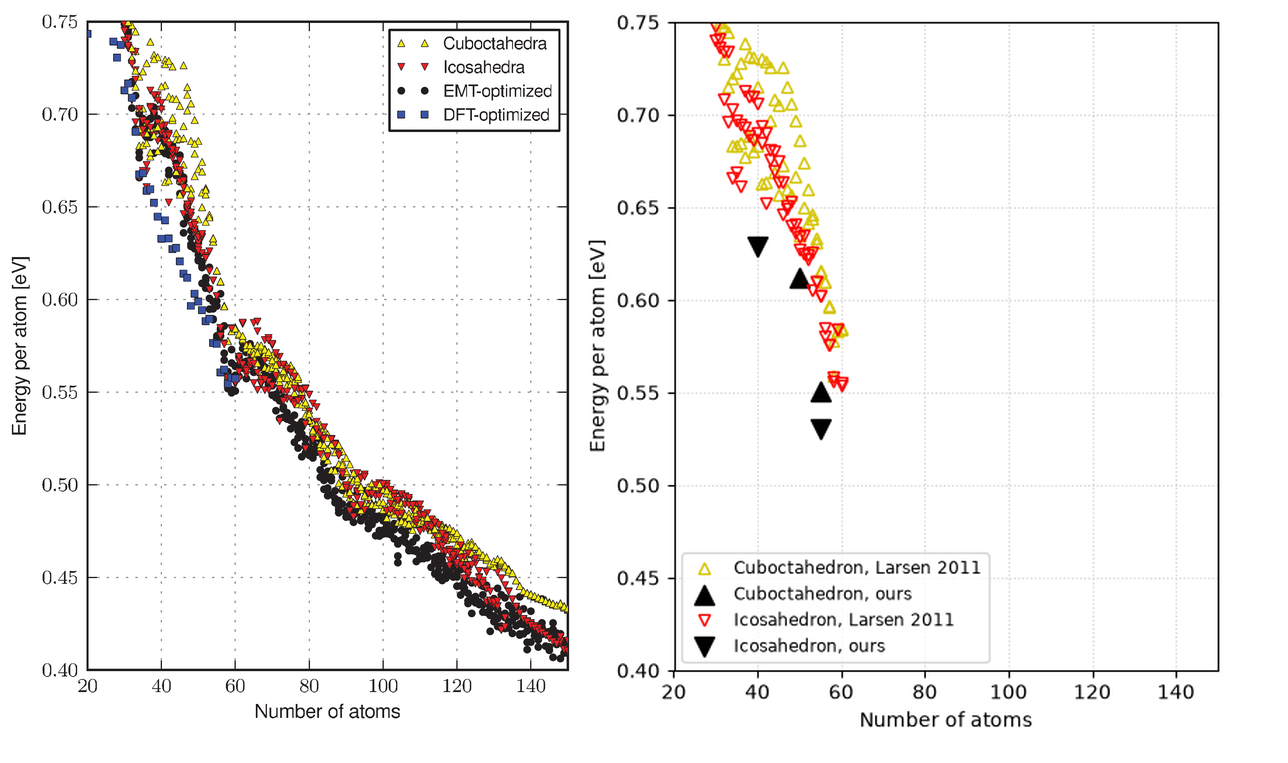
Section 8.1 of the notebook prints the total energy per atom of bulk gold and, per cluster, the final energy of the relaxation and Quantum ESPRESSO's total force, the norm over all atoms. Section 9 plots ΔE(N) of each relaxed cluster over the manuscript's Fig. 4, where the four random seeds of each shape form a band, and the last cell prints, per cluster in COMPARISON_SIZES, the manuscript's value beside ours. With the default settings:
1 2 3 4 | |
Between the closed shells the manuscript's value is the range over its four seeds.
6. Comparison with the manuscript
Energy per atom relative to bulk gold, in eV/atom: Fig. 4 of the manuscript (RPBE; lowest–highest over four seeds) and this tutorial (PBE; one seed).
| Cluster | Manuscript | Ours |
|---|---|---|
| Au40 Icosahedron | 0.690–0.706 | 0.629 |
| Au55 Icosahedron | 0.602 | 0.530 |
| Au50 Cuboctahedron | 0.635–0.686 | 0.612 |
| Au55 Cuboctahedron | 0.615–0.616 | 0.551 |
Uncommenting the other sizes in cell 1.2 adds their points to the plot and, for the sizes in COMPARISON_SIZES, their rows to the comparison.
7. Customization options
7.1. Run the whole series
Setting both lists of CLUSTER_SIZES_BY_SHAPE in cell 1.2 to list(range(30, 61)) relaxes both shapes at every size from 30 to 60, 62 relaxations, and plots the whole curve. The structure notebook saves the same clusters when its own CLUSTER_SIZES_BY_SHAPE is set the same way.
7.2. Adjust computational resources
The default, CLUSTER_NAME = None, uses the account's first listed cluster; setting a specific name picks that cluster instead, and a name that is not available makes the notebook stop and list the ones that are. PPN and TIME_LIMIT in cell 1.3 set the cores and wall time of every job.
8. Troubleshooting
8.1. Material not found
Loading raises when a name is missing from the uploads folder and the account's materials collection. Run the notebook of the Gold Nanoclusters tutorial with the same CLUSTER_SIZES_BY_SHAPE; it saves the clusters under the names Au<N> <Shape>.
9. Interactive JupyterLite notebook
The following JupyterLite notebook calculates the energy per atom of the gold clusters. Select Run > Run All Cells.
10. References
-
Ask Hjorth Larsen, Jesper Kleis, Kristian Sommer Thygesen, Jens K. Nørskov, and Karsten Wedel Jacobsen. Electronic shell structure and chemisorption on gold nanoparticles. Phys. Rev. B, 84(24):245429, 2011. URL: https://doi.org/10.1103/PhysRevB.84.245429. ↩